Custom Share Buttons with Floating… vs WP to LinkedIn Auto Publish (2026)
Detailed side-by-side comparison of two WordPress plugins, based on real-time data from WordPress.org.

Custom Share Buttons with Floating…
5.0K+ active installs
Free

WP to LinkedIn Auto Publish
1.0K+ active installs
Free
Quick Verdict
As of April 2026, Custom Share Buttons with Floating… has a higher user rating (4.8/5 from 93 reviews) and leads in active installations (5.0K+ vs 1.0K+). Both are free WordPress plugins. Custom Share Buttons with Floating… has accumulated 472K+ total downloads while WP to LinkedIn Auto Publish has 98K+.
Detailed Comparison
| Metric | Custom Share Buttons with Floating… | WP to LinkedIn Auto Publish | |
|---|---|---|---|
| Rating | 4.8/5 | ◄ | 4.7/5 |
| Total Reviews | 93 | ◄ | 59 |
| Active Installs | 5.0K+ | ◄ | 1.0K+ |
| Total Downloads | 472K+ | ◄ | 98K+ |
| Support Resolution | N/A | N/A | |
| Last Updated | 2 years ago | ► | 1 month ago |
| First Released | 2014 | 2013 | |
| Age | 12 years | 13 years | |
| WP Requires | 5.6+ | 2.8+ | |
| PHP Requires | false+ | false+ | |
| Business Model | Free | Free | |
| Latest Version | 4.2 | 1.9.10 |
Rating Breakdown
Custom Share Buttons with Floating…
WP to LinkedIn Auto Publish
Download Trends
Over the past 30 days, Custom Share Buttons with Floating… averaged approximately 7 daily downloads while WP to LinkedIn Auto Publish averaged 26.
Recent Reviews
Custom Share Buttons with Floating… Reviews
Plugin with Excellent Support!
I have been using it for several months now, and found it very useful. However, now I have a theme which incorporates sharing buttons already. Get this plugin, you won’t regret it. And the creator, Mr
Very good plugin and support!
Very useful. I recommend it 100%
Top Quality Experience!
Amazing service and support! Easy to configure and if you’ll have any questions, the support team is always happy to help.
WP to LinkedIn Auto Publish Reviews
Great and easy
Easy to configure and it works
It’s not work
it’s not working
good service
it’s a great idea to create such a service, thank you
More Linkedin Worth Comparing
Top alternatives in the same category as Custom Share Buttons with Floating… and WP to LinkedIn Auto Publish

Adds links to all of your social media and sharing site profiles. Tons of icons come in 3 sizes, 4 icon styles, and 4 animations.

The simple method to add Open Graph metadata to your entries so that they look great when shared on sites.

Easily display more than 100 social icons inside your WordPress widget.

Social Login with Discord, Facebook, Google, Twitter, LinkedIn and 40+ apps. Social login with social share and comments. Free, fast & easy! WooCo …

WP LinkedIn Auto Publish automatically publishes posts, custom posts and pages to your LinkedIn profile and/or company pages.
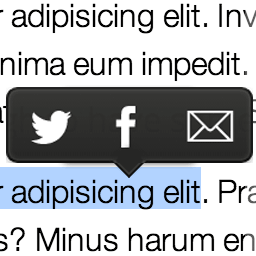
Medium like popover menu to share on Twitter, Facebook, LinkedIn or by email any text selected on the page.
Frequently Asked Questions
Is Custom Share Buttons with Floating… or WP to LinkedIn Auto Publish more popular?
Which has better ratings — Custom Share Buttons with Floating… or WP to LinkedIn Auto Publish?
Are Custom Share Buttons with Floating… and WP to LinkedIn Auto Publish free?
Which plugin has better support — Custom Share Buttons with Floating… or WP to LinkedIn Auto Publish?
Which plugin is updated more frequently?
Plugin data sourced from WordPress.org. Comparison and analysis by PluginSift.